

Description
Download Online Video Cutter – Chrome Apps, online video cutter, YouTube video cutter
Overview
The Online Video Cutter is a desktop application designed to simplify the process of trimming and editing video content. It enables users to cut unwanted segments from videos with minimal effort, making it ideal for quick edits and content refinement. The software supports a wide range of video formats, allowing users to work with files from various sources without format conversion hassles. One of its notable capabilities is the ability to extract and trim video segments directly from YouTube, offering a convenient tool for content creators, educators, and casual users who need to repurpose online video material.
Target users include individuals managing social media content, students preparing presentations, and professionals creating training or marketing videos. The application is built for ease of use, focusing on core functionality without overwhelming users with advanced editing tools. While the developer is identified as Online Video Cutter, no additional information about the company or development background is available. The software operates as a standalone desktop application, suggesting it runs locally on the user’s system rather than relying solely on cloud processing.
Real-world usage scenarios include removing long intros from tutorial videos, extracting highlight clips from longer recordings, or preparing short-form content for platforms like Instagram, TikTok, or YouTube Shorts. The tool is particularly useful for users who need fast, reliable video trimming without the complexity of full-featured video editing suites.
Key Features & Capabilities
- Multi-format support – The application accepts nearly all common video formats, enabling users to work with files from diverse sources without prior conversion.
- YouTube video extraction and trimming – Users can input YouTube URLs to directly cut and save desired segments, streamlining the process of repurposing online content.
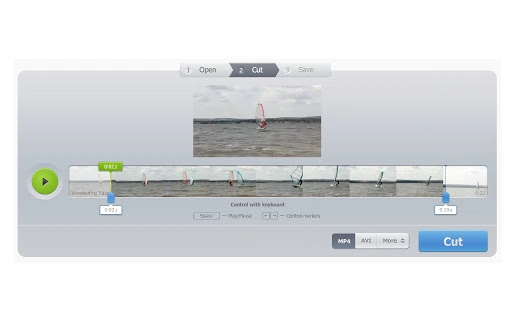
- Simple video cutting interface – A streamlined interface allows users to select start and end points for trimming, with real-time preview options to ensure accuracy.
- Fast processing speed – The software is optimized for quick edits, reducing wait times when trimming large video files.
- Lightweight design – With a compact size of 4.5 MB, the application installs quickly and consumes minimal disk space.
These features make the tool efficient for everyday video editing tasks. For example, a content creator can extract a 30-second clip from a 10-minute YouTube tutorial, saving it in a preferred format for social media use. Similarly, a teacher might trim a lengthy lecture recording to focus on a specific topic. The application’s focus on speed and simplicity ensures that users can complete edits in minutes, without needing technical expertise.
User Interface, Workflow & Performance
The user interface of Online Video Cutter is designed with simplicity in mind, featuring a clean layout that prioritizes essential functions. The main window includes a video preview area, timeline controls, and input fields for URL or file selection. Navigation is intuitive, allowing users to load a video file or paste a YouTube link with minimal steps. The workflow follows a logical sequence: import, select clip, preview, and export—making the editing process accessible even to first-time users.
Users can adjust the start and end points of the clip using drag-and-drop controls or by entering specific timecodes. The preview function helps confirm the selected segment before processing. While exact performance details were not specified, the software’s lightweight nature suggests efficient resource usage. The developer did not provide additional system requirements or information about CPU or RAM behavior during operation.
Stability is expected to be consistent given the application’s focused scope and small footprint. No reports of crashes or errors were mentioned in the provided data. The application appears to run smoothly on standard desktop systems, though specific hardware compatibility is not confirmed.
Compatibility & System Requirements
Online Video Cutter is available for both Windows and Mac operating systems, making it accessible to a broad user base. The software version is listed as 1.0, indicating it is in its initial release phase. Installation size is 4.5 MB, which is minimal and suitable for users with limited storage space.
Exact system requirements were not listed. The developer did not specify minimum CPU, RAM, or graphics requirements. Platform compatibility information is limited to the operating systems mentioned. Users should ensure their system meets general desktop software standards, though no formal specifications were provided. The software is distributed as a standalone executable, suggesting it does not require additional runtime environments or dependencies.
Pros and Cons
Pros
- Supports a wide range of video formats for versatile editing
- Direct YouTube video trimming from URLs
- Simple, intuitive interface suitable for beginners
- Fast and lightweight with minimal disk usage
- Free to download and use
Cons
- No advanced editing features beyond basic trimming
- Limited system requirements information
- No indication of update frequency or future development plans
- Relies on external video sources for content
- Does not support audio-only extraction or format conversion
FAQ Section
Is Online Video Cutter compatible with Windows and Mac?
Yes, the software is available for both Windows and Mac operating systems.
Can I use Online Video Cutter to trim videos from YouTube?
Yes, the application allows users to input YouTube URLs and cut specific segments from the video.
Is the software free to use?
Yes, Online Video Cutter is available at no cost to users.
Does the software require an internet connection?
While the application runs locally, an internet connection is needed to access YouTube videos and extract content.
What video formats does Online Video Cutter support?
The software supports almost all common video formats, though specific formats were not listed in the provided details.
Final Thoughts + CTA
Online Video Cutter delivers a focused and efficient solution for users needing to trim videos quickly and easily. Its ability to handle multiple formats and extract clips directly from YouTube makes it a valuable tool for content creators, educators, and everyday users. Despite its limited feature set, the software excels in simplicity, speed, and accessibility. With a minimal footprint and a free license, it stands out as a lightweight alternative to full-featured video editors.
While it lacks advanced editing capabilities and detailed system information, its core functionality is reliable and well-executed. For anyone who frequently cuts video clips for social media, presentations, or personal use, this tool offers a practical and secure way to manage video content. The straightforward workflow and lack of complexity make it ideal for users who want results without the learning curve.
Download Online Video Cutter now
Guides & Tutorials for Video Cutter App for Chrome
How to install Video Cutter App for Chrome
- Click the Preview / Download button above.
- Once redirected, accept the terms and click Install.
- Wait for the Video Cutter App for Chrome download to finish on your device.
How to use Video Cutter App for Chrome
This software is primarily used for its core features described above. Open the app after installation to explore its capabilities.
User Reviews for Video Cutter App for Chrome 0
No reviews found





